Thermalright Vision-1 Brings Snap-On LCD Displays to 120mm PC Fans
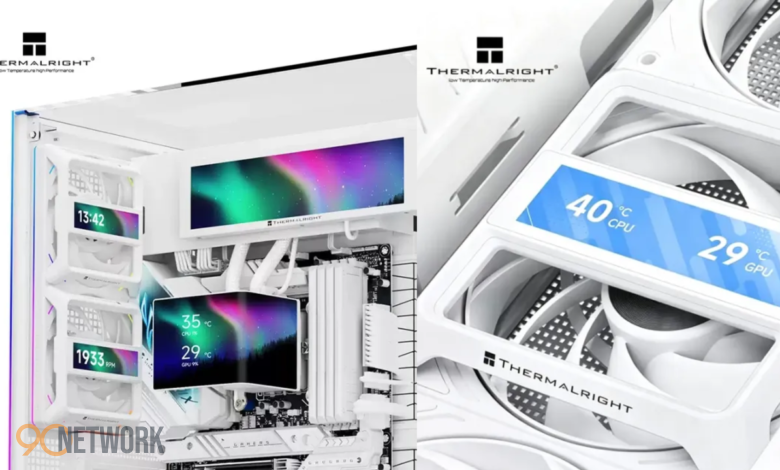
PC builders looking to customize their desktop setups now have a modular option for monitoring internal hardware. The Thermalright Fan Frame Vision-1 introduces a clip-on 3.69-inch LCD screen designed to attach directly in front of standard 120mm PC case fans. This accessory allows users to monitor real-time system stats while adding personalized visual themes inside their build.
Features of the Thermalright Fan Frame Vision-1
Mounting displays inside computer cases traditionally required dedicated screen mounts, custom liquid cooler blocks, or specialized chassis designs. The Thermalright Fan Frame Vision-1 simplifies this process by attaching directly to existing 120mm fans. Consequently, builders can position the display over intake or exhaust points without replacing their current cooling setup.
The compact 3.69-inch screen offers clear visibility through tempered glass side panels. Users can display critical operational statistics, such as real-time component temperatures and active fan speeds. Furthermore, support for custom themes enables enthusiasts to sync visual elements across multiple fan screens to build a cohesive look.
How Snap-On Displays Change Desktop Customization
Integrating screens into PC cases has become a major trend among hardware enthusiasts. However, built-in displays are usually restricted to high-end all-in-one liquid CPU coolers or specialized case panels. Modular hardware accessories offer a much more versatile approach for standard builds.
By mounting directly onto standard 120mm fan frames, these snap-on displays eliminate the need to purchase expensive proprietary cooling units. As a result, users gain greater freedom to add or reposition screens anywhere a standard fan frame exists.
Practical Applications for Hardware Monitoring
Beyond visual appeal, internal displays offer practical value for system performance tracking. Positioned prominently inside the case, mini screens permit quick thermal checks during intensive tasks like gaming or rendering.
Key metrics and elements that can be monitored include:
- System Temperatures: Live thermal readout for processing units and graphics cards.
- Cooling Performance: Real-time fan speed and air throughput indicators.
- Custom Graphics: Personalized artwork, animations, or unified visual themes.
The Future of Modular PC Aesthetics
As PC design trends prioritize clean layouts and high-visibility glass enclosures, modular hardware accessories continue to evolve. The arrival of clip-on fan screens shows how hardware manufacturers are utilizing previously unused internal space. Combining functional hardware monitoring with aesthetic customization gives PC builders an accessible way to personalize their systems.
90Network covers more PC cooling accessories across the site.