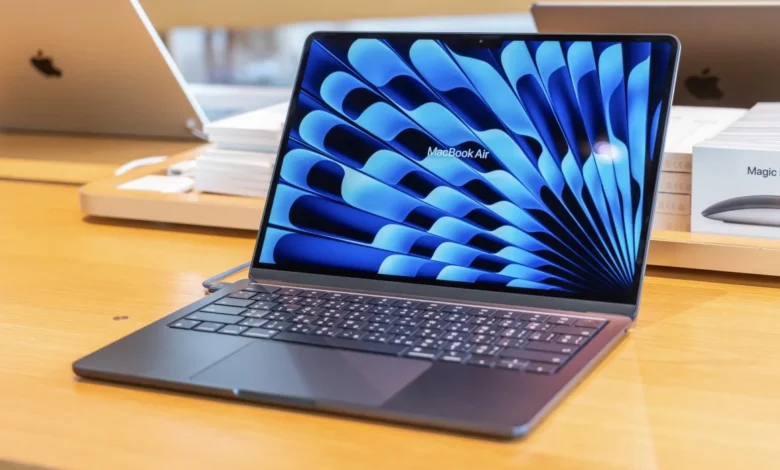
Apple’s MacBook Air has long been one of the most popular laptops in the world. Known for its slim design, quiet operation, and reliable performance, it has become a go-to choice for students, professionals, and everyday users alike.
With the release of the MacBook Air powered by Apple’s M5 chip, Apple continues that tradition—but without dramatically changing the formula. The latest model focuses primarily on improving performance and efficiency rather than redesigning the laptop from the ground up.
The result is a device that feels very familiar but runs faster and handles modern computing tasks more efficiently. According to reviews, the M5 version keeps the same overall design while delivering stronger performance thanks to the updated processor.
A Familiar Design That Still Works
At first glance, the new MacBook Air M5 looks nearly identical to its predecessor. Apple has chosen not to alter the overall design that debuted with recent generations of the Air.
The laptop retains several signature features:
- Thin aluminum body
- Fanless cooling system
- Liquid Retina display with slim bezels
- MagSafe charging port
- Two Thunderbolt/USB-C ports
Apple continues to offer the laptop in two sizes: 13-inch and 15-inch, giving users flexibility depending on their preference for portability or screen space.
While some consumers may have hoped for a new design, the reality is that the current MacBook Air design is already widely praised for its balance of portability, durability, and aesthetics.
The M5 Chip: The Real Upgrade
The biggest change in the MacBook Air M5 is exactly what its name suggests—the Apple M5 processor.
Apple’s newest chip brings improvements in CPU performance, graphics capabilities, and AI processing power.
Key specifications include:
- 10-core CPU (performance and efficiency cores)
- Up to 10-core GPU
- Advanced Neural Engine for AI tasks
- Faster unified memory
These improvements translate into measurable performance gains compared with the previous generation. Benchmarks suggest the M5 can deliver around 11% faster single-core performance and roughly 17% better multi-core performance than the M4 chip.
Graphics performance also sees notable improvements, with some tests showing gains of over 30% in GPU workloads.
In everyday use, that means faster app launches, smoother multitasking, and improved performance in creative tasks such as photo editing and video work.
Built for AI and Modern Workloads
One of the most important improvements in the M5 chip is its enhanced ability to handle AI-driven tasks.
Apple has been steadily integrating artificial intelligence capabilities into its operating systems and applications. The M5 chip includes upgraded neural processing capabilities designed to accelerate machine learning workloads.
According to Apple, the chip can deliver up to four times faster performance in certain AI operations compared to the previous generation.
This improvement matters because many modern features now rely on AI, including:
- On-device language models
- Photo and video enhancements
- Smart search features
- AI-powered productivity tools
As software becomes more AI-focused, this extra processing power could help extend the lifespan of the laptop.
Performance in Everyday Use
Despite the impressive technical upgrades, the MacBook Air M5 still targets a very specific type of user.
It is designed primarily for everyday productivity and light creative work rather than heavy professional workloads.
Typical tasks the Air handles comfortably include:
- Web browsing with many tabs
- Office productivity apps
- Video calls and online meetings
- Photo editing
- Light video editing
Because the laptop remains fanless, it operates silently even under moderate workloads.
However, professionals who frequently run demanding software such as 3D rendering tools or advanced video editing applications may still benefit from a MacBook Pro with active cooling.
Storage and Memory Improvements
Another notable improvement in the latest MacBook Air is its better base configuration.
Earlier models often shipped with minimal storage, which frustrated some users. The new generation improves the baseline hardware configuration.
Typical starting specs include:
- 16GB unified memory
- 512GB SSD storage
The laptop can be configured with up to 32GB of RAM and several terabytes of storage, depending on the user’s needs.
Additionally, tests have shown significantly faster storage speeds compared with previous models, with some reports suggesting dramatic improvements in read and write performance.
Battery Life Remains a Major Strength
Battery life has always been one of the MacBook Air’s strongest selling points, and the M5 model continues that tradition.
Apple claims the laptop can deliver up to around 18–20 hours of battery life, depending on usage.
In real-world testing, many users can comfortably get through a full day of work without needing to recharge.
This makes the MacBook Air especially attractive for:
- Students attending classes all day
- Remote workers
- Travelers who need long battery life
Combined with the laptop’s lightweight design, the Air remains one of the most portable high-performance laptops available.
Display, Speakers, and Webcam
Beyond raw performance, the MacBook Air continues to deliver a premium experience in several other areas.
The Liquid Retina display remains bright, sharp, and color-accurate, making it ideal for media consumption and creative work.
Key display features include:
- High-resolution Retina panel
- Up to 500 nits brightness
- Wide color support
The speakers also remain surprisingly powerful for a thin laptop, delivering clear sound with good spatial depth.
Meanwhile, the built-in webcam supports high-quality video calls, which has become increasingly important for remote work and online meetings.
Who Should Buy the MacBook Air M5?
The MacBook Air M5 is designed for a wide range of users, but it shines particularly in certain scenarios.
Ideal buyers include:
Students
The Air’s lightweight design, long battery life, and strong performance make it perfect for schoolwork and everyday tasks.
Remote workers
Productivity apps, spreadsheets, and video conferencing run smoothly on the M5 chip.
Creators with light workloads
Tasks such as photo editing, basic design work, and short video projects are well within the Air’s capabilities.
However, professional creators working on heavy rendering tasks or large-scale projects may still prefer the MacBook Pro lineup.
Should You Upgrade?
Whether the MacBook Air M5 is worth upgrading to depends largely on what you are currently using.
Upgrade if you have:
- An older Intel-based MacBook
- A MacBook Air with the M1 chip
- A laptop several years old
The jump in performance, battery life, and efficiency will be very noticeable.
However, users with the MacBook Air M4 or even M3 may not see a dramatic difference in everyday tasks.
In those cases, waiting for a more significant redesign could make more sense.
The Bigger Picture
The MacBook Air M5 represents Apple’s typical approach to hardware updates: steady refinement rather than radical change.
Instead of reinventing the laptop, Apple focused on:
- Improving performance
- Strengthening AI capabilities
- Increasing storage and memory
- Maintaining excellent battery life
This strategy keeps the MacBook Air competitive in a crowded laptop market while preserving the features users already love.
Final Verdict
The MacBook Air M5 may not introduce a dramatic new design, but it continues to refine one of the best laptops on the market.
With a faster processor, stronger AI capabilities, improved storage performance, and excellent battery life, the latest model delivers meaningful upgrades while maintaining the same reliable formula.
For most users looking for a lightweight and powerful everyday laptop, the MacBook Air M5 remains one of the easiest recommendations in 2026.





Wow, amazing blog layout! How long have
you been blogging for? you made blogging look easy.
The overall look of your site iis wonderful,
as well as the content!